


WhatsApp Developing Notification Bubbles on Android to Boost Multitasking
The CSR Journal Magazine

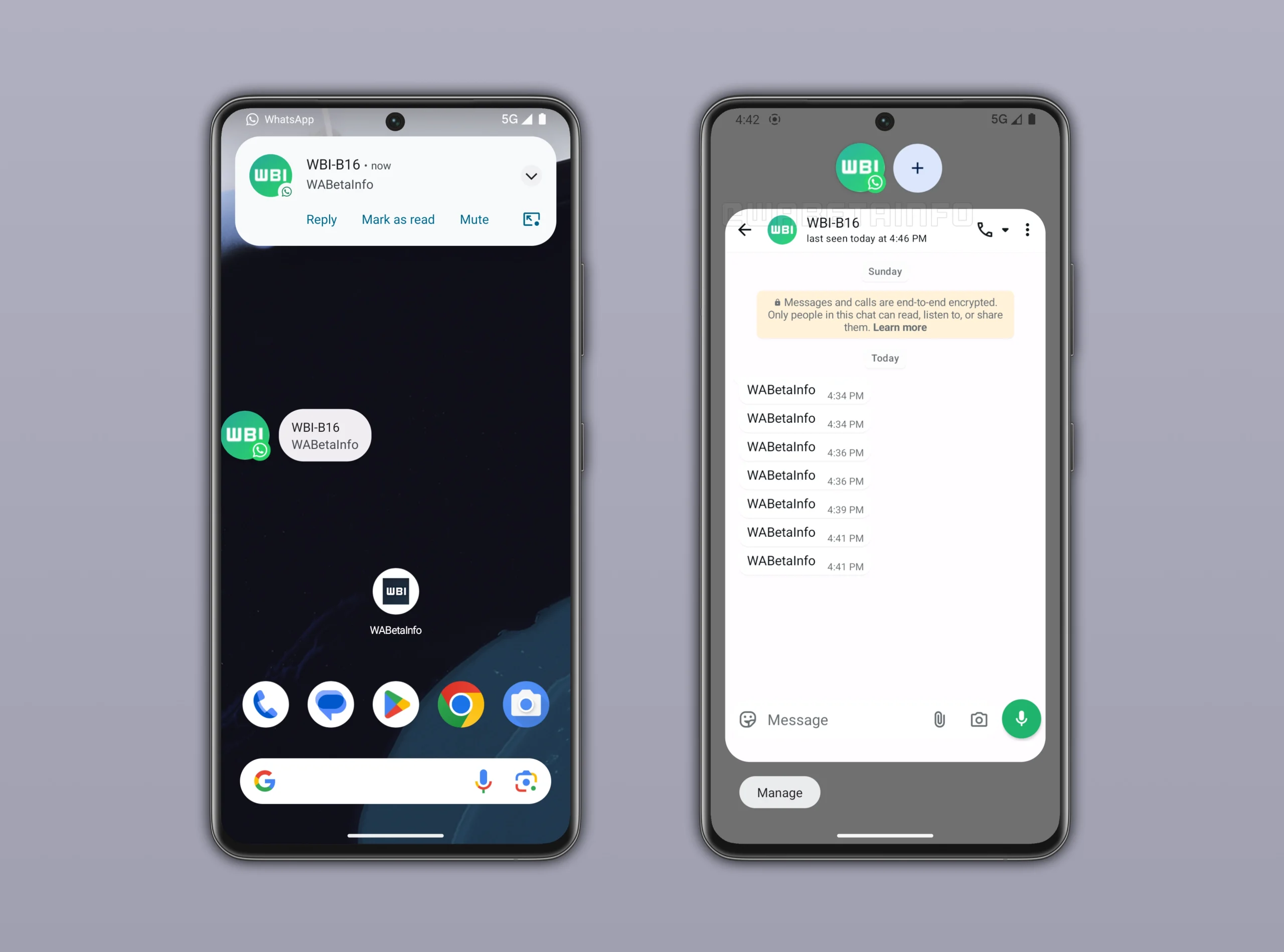
WhatsApp is reportedly advancing its development of notification bubbles for Android devices, aiming to enhance user convenience in managing conversations. Users familiar with Facebook Messenger will recognise this feature, designed to simplify access to chats without necessitating the full opening of the application. Currently, it remains in the developmental phase and is not available for beta testing.

According to sources such as WABetaInfo, this feature is intended to improve chat visibility and interactions on Android by facilitating quicker message access and replies while using other applications. The integration with the Android notification system is expected to support a more efficient multitasking experience during ongoing conversations.

Upcoming Redesign of WhatsApp Interface

In addition to the notification bubbles, WhatsApp is planning a significant redesign of its top app bar. The redesign will replace the existing app name with WhatsApp’s official logo, marking a considerable change from the interface established in 2013. This alteration could also pave the way for potential status updates within the top bar, signalling a more extensive reorganisation of the user interface.

The updates reflect WhatsApp’s commitment to keeping pace with user expectations and technological advancements. As interfaces evolve across platforms, the changes aim to create a more intuitive user experience, making it easier for users to navigate their chats and access necessary features.

While aims for the update are set, users can anticipate a gradual rollout. As adjustments are made to not only the user interface but also functionalities, feedback from early user interactions may inform future developments.

Functionality and User Experience of Notification Bubbles

The planned notification bubbles will appear as floating icons, allowing users to view chats without interrupting their ongoing activities, such as watching videos or browsing other apps. When a message is received, a bubble will emerge displaying the sender’s profile picture alongside the WhatsApp icon. Users can engage with messages directly from this bubble, providing an option for instant reading and replying.

This feature draws inspiration from similar implementations in other applications like Facebook Messenger, potentially benefiting users who enjoy multitasking. However, some may find this functionality intrusive. Users will have the flexibility to disable the notification bubbles whenever they choose, allowing for a personalised experience.

Notification bubbles are expected to be compatible with Android 10 and newer versions, with the functionality tested more effectively on Android 11 and above. Availability may vary based on specific device settings, and users might need to activate this option manually, heralding a focused effort by WhatsApp to refine user control over notifications.

Despite being in the refining stage, WhatsApp intends to initially introduce this feature to selected beta testers before a broader release. Overall, these updates reflect WhatsApp’s focus on streamlining messaging experiences and improving integration with the Android operating system.

Long or Short, get news the way you like. No ads. No redirections. Download Newspin and Stay Alert, The CSR Journal Mobile app, for fast, crisp, clean updates!

App Store –  https://apps.apple.com/in/app/newspin/id6746449540 

Google Play Store – https://play.google.com/store/apps/details?id=com.inventifweb.newspin&pcampaignid=web_share

Latest News

Popular Videos
