


ChatGPT Can Now Link to Your Bank Account to Help Track Spending, Savings and Financial Goals
The CSR Journal Magazine

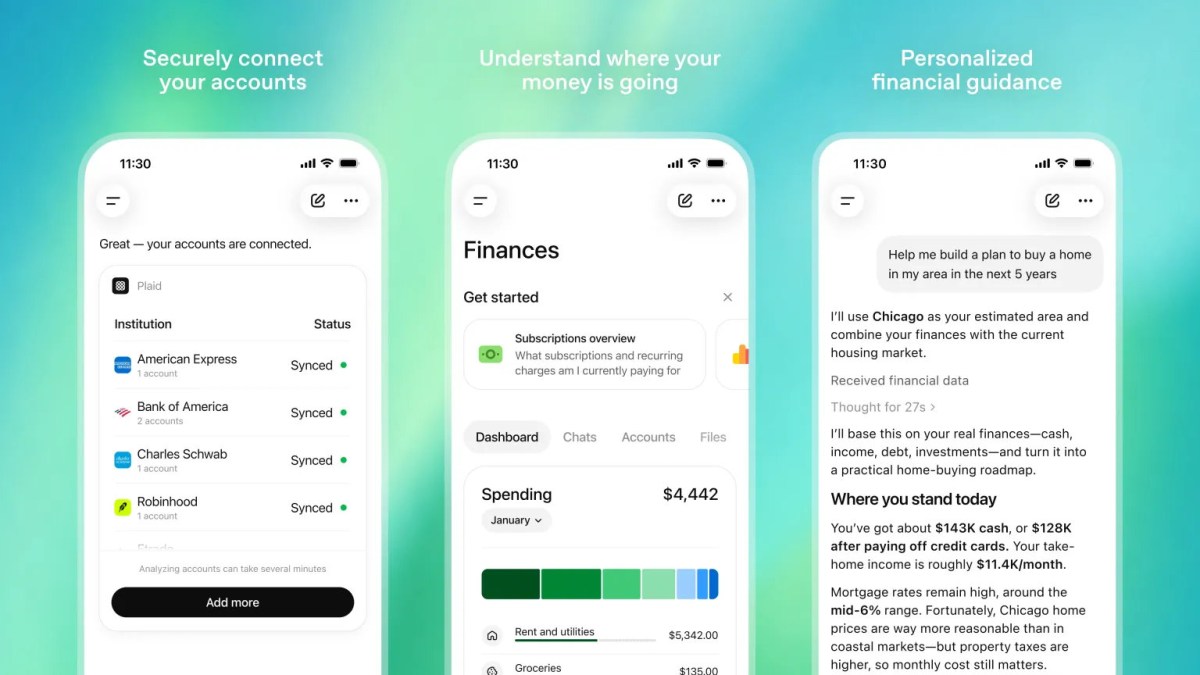
ChatGPT now enables users to connect their bank accounts, credit cards, and investment accounts directly to the platform. This new feature allows ChatGPT to function as a personalised financial assistant, moving beyond generic budgeting advice. OpenAI has designed it to streamline users’ financial management by consolidating various aspects of their finances in a single interface.

The update introduces a specific “Finances” section within ChatGPT, providing a comprehensive dashboard that reports on various financial metrics. Users will be able to view insights related to their spending habits, ongoing subscriptions, upcoming financial obligations, savings progress, and portfolio performance. The integration aims to minimise the necessity of toggling between different banking applications and financial tools.

Limited Availability for Users in the US

This feature is currently accessible exclusively to ChatGPT Pro users in the United States, available on both web and iOS platforms. The service is compatible with over 12,000 financial institutions. OpenAI stated that it aims to monitor the usage patterns of this feature prior to rolling it out to Plus users and extending its accessibility to a broader audience.

To initiate the financial tracking capability, users can access the Finances tab located in the ChatGPT sidebar. They can either click on “Get started” or input “@Finances, connect my accounts” in a chat. The system will then guide users securely through the process of linking their accounts via Plaid, a service that provides financial connectivity to various applications.

Once successfully linked, ChatGPT proceeds to sync and categorise the user’s financial data, which may take a few moments to complete. This configuration allows the chatbot to offer tailored financial advice based on actual expenses and financial circumstances, rather than relying solely on standard budgeting tips.

Advanced Financial Insights and Features

After account linkage, users can inquire about their financial situations with greater specificity. They may ask questions regarding recent increases in spending, the feasibility of major purchases, monthly savings rates, and planning for future investments, such as buying a home. The update has also expanded to include functionalities for goal planning, analysis of travel expenditures, reviews of subscriptions, and assessments of investment risks.

One illustrative use case was disclosed by OpenAI, showing how ChatGPT analysed recurring expenses and cash-flow patterns. It suggested appropriate monthly limits for categories like shopping, dining, and groceries, while also advising on automatic transfers to savings accounts. This function aims to enhance users’ financial discipline and awareness.

Additionally, the update introduces the concept of “financial memories.” This feature enables ChatGPT to retain critical financial information, such as existing mortgages, saving targets, or debts owed to relatives. Such memory capacity enhances the overall user experience by allowing the AI to provide more context-sensitive guidance in future interactions, connecting various financial elements holistically.

Privacy and Data Security Measures

On the matter of user privacy, OpenAI clarifies that while ChatGPT can access balances, transactions, and other financial information post-account linkage, it does not have access to complete account numbers nor can it modify banking details. Furthermore, users retain control and can disconnect their accounts at any time, with assurances that synced financial data will be deleted from OpenAI’s records within 30 days of disconnection.

Temporary conversations will not interact with the synced financial accounts or be stored in chat history, reinforcing OpenAI’s commitment to user privacy. This approach aims to provide both utility and security, reassuring users about their financial data while utilizing the new features.

Long or Short, get news the way you like. No ads. No redirections. Download Newspin and Stay Alert, The CSR Journal Mobile app, for fast, crisp, clean updates!

App Store –  https://apps.apple.com/in/app/newspin/id6746449540 

Google Play Store – https://play.google.com/store/apps/details?id=com.inventifweb.newspin&pcampaignid=web_share

Latest News

Popular Videos
