



YouTube is a very competitive platform, as there are millions of creators fighting to get the attention of the audience. To be unique, your content should not just be appealing to the eye but must also be a well-written script that would attract the viewers immediately and keep them glued till the end. The process of writing a YouTube video script that would be informative yet entertaining can be time-consuming, but the CapCut tool named AI Writer is an innovative solution that allows a person to create a faster, more efficient, and engaging script.
CapCut PC provides creators with the power to create and tailor high-quality video scripts in minutes with the help of AI Writer. You can make some of the best tutorials, vlogs, product reviews, and any other kinds of content with the help of this tool to create some amazing stories that are related to the interests of your audience. This paper shall examine how to use CapCut’s AI writer to come up with effective YouTube video scripts that are very engaging and catchy to the viewers.
Why AI writer is a game-changer for YouTube content creators
The process of creating a YouTube script encompasses several important aspects, such as the introduction of your subject in a manner that will allow the viewer to pay attention to what you are saying, the development of the main body of the video by means of making the points clear and well-structured, and, last, but definitely not the least, the conclusion, which must leave the viewer with a strong impression. It is not always easy to be consistent and creative around numerous videos, which makes this process overwhelming. The problem is that the creators have to invent new ideas and make each script attractive to the particular audience.
Saving time with AI-Powered Scriptwriting
Time management is one of the greatest problems facing YouTube creators. Composing a script manually is time-consuming, and the stress of having to write new content continuously may be too much to handle. The AI Writer can solve this issue because it can write script versions very fast, which means that you do not need to write a new one each time. The AI takes only a few minutes to create topics and key points that are relevant to your video theme and drastically reduces the time you spend brainstorming and writing.
Personalising to Captivate Audiences
Although a good script base is created through the use of the AI Writer, one can still customise it so that it fits one’s own style and target market. You only need to adjust the script to your own voice, whether you want to use the educational tone, the conversational tone, or a funny one, which is what AI Writer allows you to achieve. Through tone, length of videos, and certain points of content, you can make sure that your script is not only practical to the video but also attractive to your particular audience.
Steps to Create YouTube Video Scripts with AI Writer in CapCut PC
The AI Writer by CapCut PC also makes the process of writing a script for a video on YouTube very simple and easy.
Here’s how to get started:
Step 1: Install CapCut
You must install CapCut on your desktop before you can begin using AI Writer. CapCut can run on both Windows and Mac; thus, downloading and installing the software is all one needs to start with. After it is installed, open CapCut and start writing your script.

Step 2: Select AI Writer
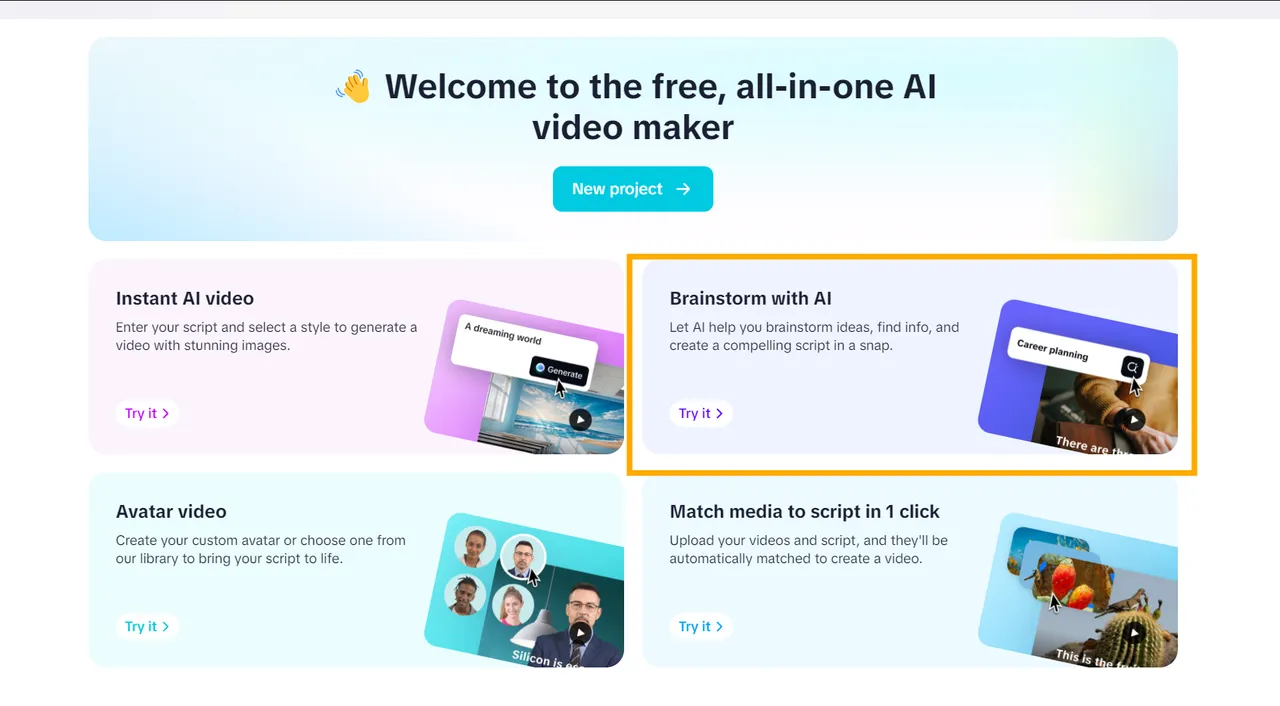
Once CapCut has started, go to the AI video maker option on the main interface. This will clear the field for AI-powered tools.

In this case, you will find the option of Brainstorm with AI; this option will then direct you to begin to come up with video topics to write in your script. You are required to input your video idea in the field, and the AI will propose a list of relevant issues that fit the theme of your content. You are able to select the most appropriate subject and proceed to script development.
Step 3: Generate and customise your video script
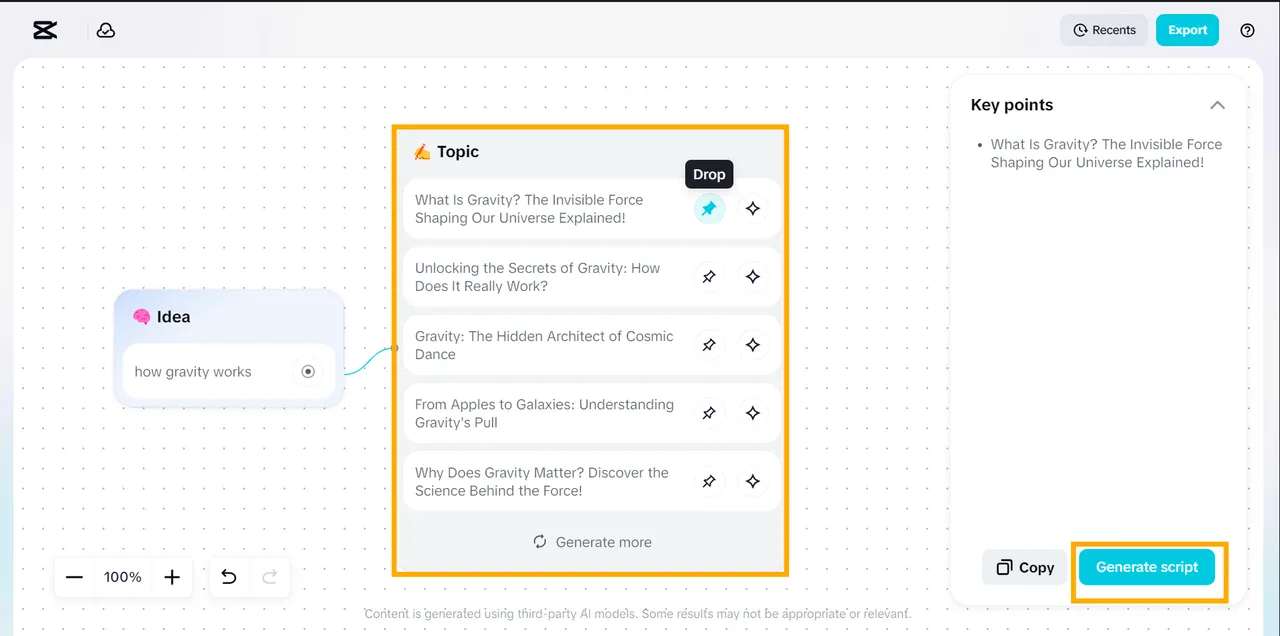
Enter your YouTube video idea into the input field, and the AI will instantly produce a list of recommended topics based on current YouTube trends. You can “Pick” (pin icon) the topics that best fit your concept, or click “Explore” (sparkle icon) to view additional suggestions. Once your topics are selected, they will automatically be converted into key points for your script. To move forward, click “Generate Script.”
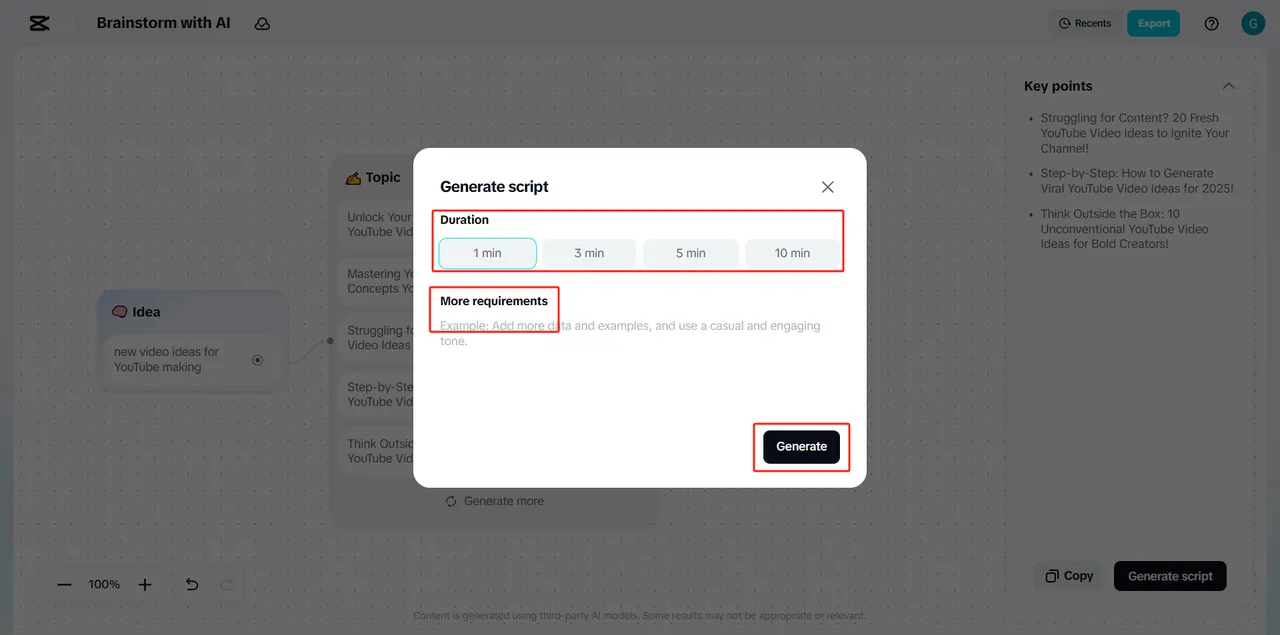
On the customisation page, you can change the Duration of your video (i.e. 1 minute, 5 minutes, or any other) and change the tone of the text. You can use either a casual, professional, or humorous tone, but you can customise the content to suit the expectations of your audience by using all three with the help of AI Writer.
If you’re satisfied with the generated script, click “Use.” If not, select “Cancel” to exit or choose “Create Again” to have the AI produce a new script from scratch.
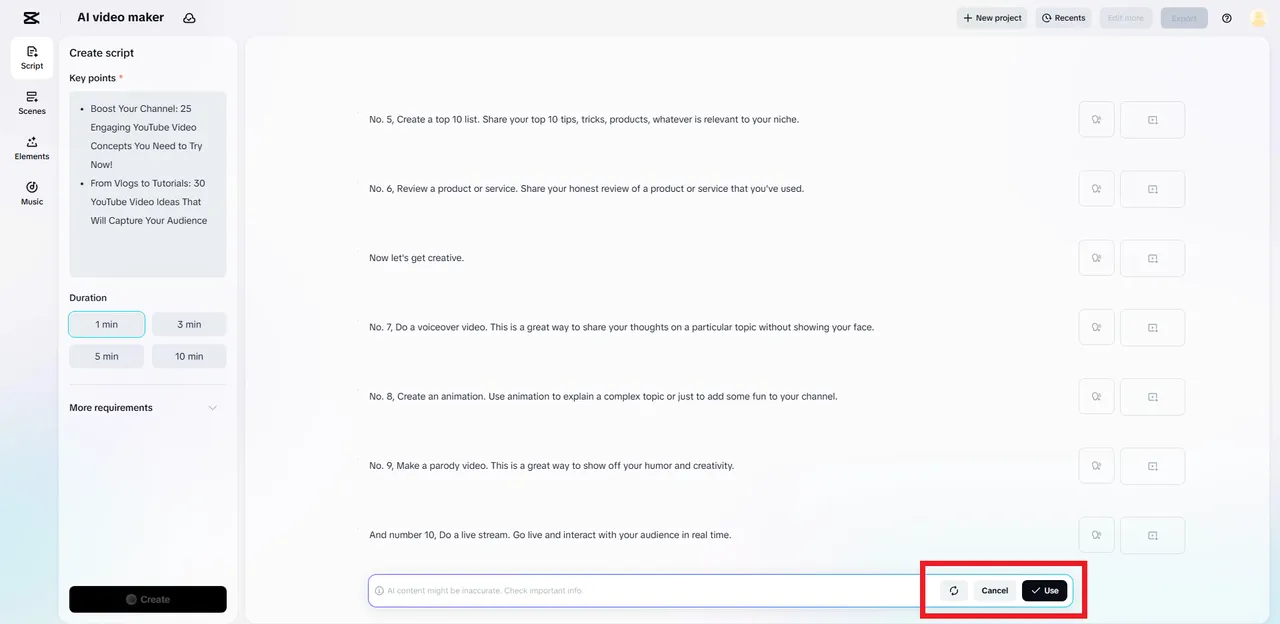
Once you have written your script, go to the next level and use an AI storyboard. Using AI Storyboard, you can see how your YouTube video is organised and create a storyboard that can help bring your script to life.
Key benefits of using an AI writer for YouTube video scripts
The advantages of using AI Writer are quite numerous and can be quite beneficial to the scriptwriting process among YouTube creators. Some of the major benefits include the following:
-
Conserves Time and Energy: The AI does most of the heavy lifting when it comes to coming up with first drafts, which saves creators hours of work when it comes to brainstorming and writing.
-
Customisation and Personalisation: You can customise the tone, style, and length of the created script to make it just right for your needs, depending on the type of YouTube content you are making, either a tutorial or a review.
-
Relevance to Topics: AI Writer employs trendy topics and keywords to make sure that the script is in line with what is currently trending and relevant to your audience.
-
Increases Consistency: You can work on content creation regularly and have a regular schedule of uploading content, as you will be spending less time on the script-writing process.
-
Get Out of a Writing Rut: AI Writer offers both ideas and structure, which is more convenient to get going on new scripts when you feel uninspired or just stuck.