


Aadhaar App Now Allows Mobile Number Updates Without Visiting Aadhaar Seva Kendra
The CSR Journal Magazine

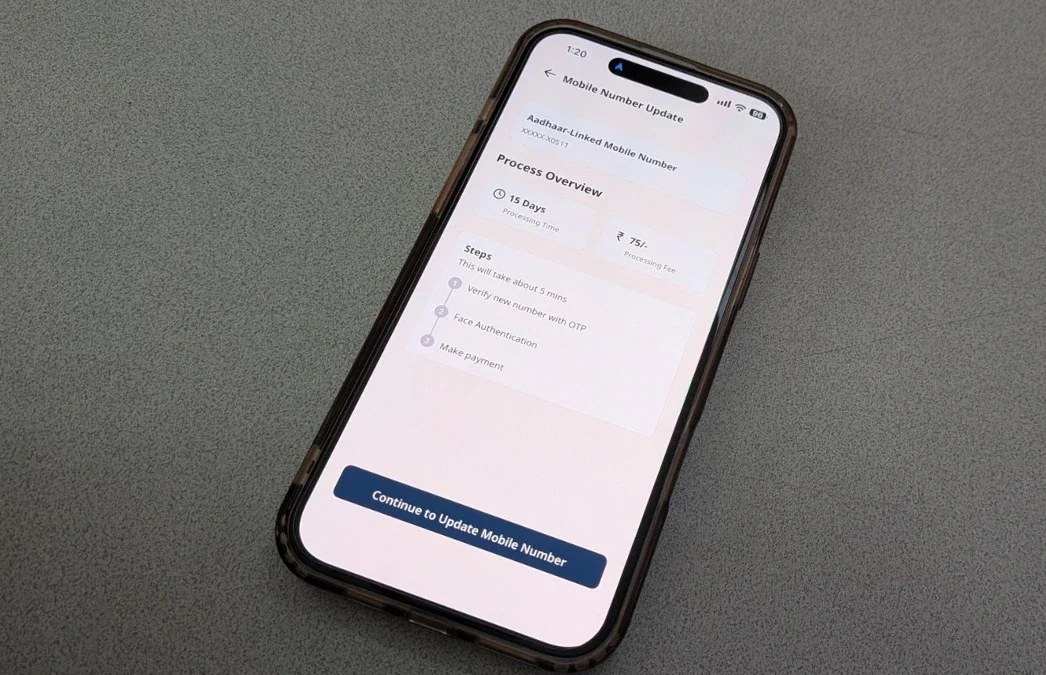
Individuals looking to update the mobile number linked to their Aadhaar can do so through the official Aadhaar App. This method allows users to make changes without visiting an Aadhaar Seva Kendra, which can be more convenient for those with busy schedules. The app is accessible on both the Google Play Store and Apple App Store, facilitating a straightforward update process.

Before proceeding with the online update, it is essential to have access to the mobile number currently registered with Aadhaar. This number is required for authentication purposes. If the user has lost access to their old number or if it has been deactivated, they will need to visit an Aadhaar Seva Kendra or an enrolment centre to complete the update.

For those who still have access to their old mobile number, the following steps outline how to update the number using the Aadhaar App. First, users should install the app from the appropriate app store and ensure that the SIM card linked to their old mobile number is active and inserted in their device.

Step-by-Step Guide to Updating Mobile Number

After opening the app, users must enter their 12-digit Aadhaar number, select their preferred language, and agree to the terms and conditions. The next step involves selecting the SIM card associated with their Aadhaar and completing face authentication. Users will also need to set a six-digit PIN to secure the app.

Once logged in, users should navigate to the ‘Services’ section and select ‘Mobile Number Update’. It is important to note that this service incurs a fee of Rs 75. Users will then enter the new mobile number they wish to link and verify it through an OTP sent to that number.

Following the verification, users must complete face authentication again and make the payment using either a card or UPI. After submitting the request, they can track the status of the update through the app’s request-tracking feature. The entire process is expected to take approximately 72 hours, after which a confirmation message will be sent to the new mobile number.

Alternative Process for Inaccessible Old Mobile Numbers

If users do not have access to their old mobile number, they cannot complete the update through the Aadhaar App. In such cases, visiting an Aadhaar Seva Kendra or an authorised enrolment and update centre is necessary. To initiate the process, individuals should locate their nearest Aadhaar centre via the UIDAI website.

Upon arrival, users will need to request the Aadhaar Update or Correction Form and fill in their new mobile number. The form must be submitted along with biometric authentication, such as fingerprints, to verify identity. The current fee for this demographic update, including a mobile number change, is also Rs 75.

After submitting the request, users will receive an acknowledgement containing an Update Request Number (URN), which can be used to monitor the status of the request. It is noteworthy that no supporting documents or the old mobile number are required for this in-person update. According to UIDAI, processing of update requests may take up to 30 days.

Long or Short, get news the way you like. No ads. No redirections. Download Newspin and Stay Alert, The CSR Journal Mobile app, for fast, crisp, clean updates!

App Store – https://apps.apple.com/in/app/newspin/id6746449540

Google Play Store – https://play.google.com/store/apps/details?id=com.inventifweb.newspin&pcampaignid=web_share

Latest News

Popular Videos
