


From Train Search to E-Ticket: Understanding the redRail Booking Process
The CSR Journal Magazine

Booking a train ticket online usually takes a few minutes. But in those few minutes, passengers make several decisions that shape the whole trip, often without noticing them.

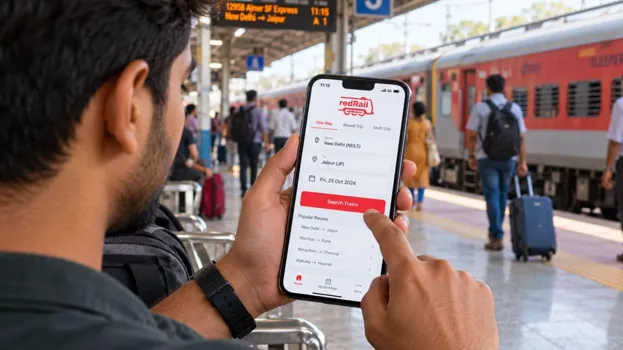
redRail, the IRCTC-authorised train booking platform from redBus, simplifies train ticket booking by bringing train searches, seat availability, fare details and e-ticket booking together in one place. Passengers can compare available trains, choose suitable travel options and complete their bookings conveniently, saving time and making journey planning easier. Knowing what to look for on each one makes the process quicker and leaves fewer surprises later.

The Search Screen

Everything starts with three details: the starting station, the destination, and the date of travel.

The date needs a moment’s thought on night trains. A train leaving at 12:30 AM belongs to the next calendar day. Passengers boarding at an intermediate station should consider when the train reaches them, not when it departs from its first station.

The Train List

The next screen lists every train on the route for that day. Each one shows the train name and number, departure and arrival times, and total journey time.

This section is where comparing options is useful. A train that leaves later may still arrive first if it has fewer stops. A convenient departure time can also mean an arrival at 3 AM. Looking at both times together gives a clearer idea of how the trip will actually feel.

The Availability Panel

Below each train, the classes are listed with their fares and seat status. AVL means seats are open. RAC means the passenger can board but will initially share a berth with another passenger. WL means the ticket will be waitlisted, which could be confirmed or not confirmed by the time the final chart is prepared.

Passengers should check every class before moving on. Sleeper may be waitlisted while AC 3 Tier still has seats on the same train.

When the Panel Shows Only Waitlists: redRail Confirm

If the passenger’s station shows a waitlist, redRail Confirm may find confirmed seats on the same train when booked from an earlier station on the route. The passenger still boards at their station. The fare is charged from the station where the ticket is booked.

When No Direct Train Works: Connecting Trains

If every direct train is full, the platform may suggest connecting trains. These are journeys on two trains with seats on both, linked through a station in between.

The Add-Ons

Before entering traveller details, passengers may see optional add-ons, depending on the train and class.

For Waitlisted Tickets: Confirm or 3X Refund

On selected trains, passengers booking a waitlisted ticket can add Confirm or 3X Refund, now called Alternate Trip. If the ticket stays fully waitlisted after the chart is prepared, they receive three times the ticket amount. One part goes back to the original payment method, and the rest comes as a voucher for a train on redRail.

For Uncertain Plans: Free Cancellation

On selected trains and classes, Free Cancellation lets passengers cancel within the allowed time and get the full fare back without railway cancellation charges.

Both add-ons carry a small extra fee, which is not refunded. They are worth choosing only when they suit the trip.

The Traveller Details Page

Here, passengers enter the name, age and gender of each traveller, along with a berth preference. Names should match the photo ID each person will carry on the train.

Berth preference is a request, not a guarantee. It depends on what is left in that class.

The IRCTC Login

Every online train ticket in India must be linked to a registered IRCTC account. Passengers sign in with the IRCTC user ID they already have, so there is no new account to create. The IRCTC password is entered at the final step to complete the booking.

Because of this, the ticket also appears in the passenger’s IRCTC booking history.

The Payment Page

The final amount is shown before payment. Along with the ticket fare, it includes an agent fee, IRCTC convenience fee, payment gateway charges and any add-ons selected.

Before Tapping Pay: Exclusive Deals

Offers and coupon codes on redRail can be applied here when they are running. Passengers should check that the discount has actually been applied before completing the payment.

The E-Ticket

Once payment goes through, the e-ticket is issued with a 10-digit PNR. Confirmation is sent by SMS and WhatsApp, and the ticket is saved in the My Bookings section of the app.

No printout is needed. The ticket on the phone, along with a valid photo ID, is enough to travel. Passengers with RAC or waitlisted tickets can follow their PNR in the app until the chart is prepared, a few hours before departure.

After Booking

On the day of travel, check the train running status to see where the train is, whether it is late, and when it will reach the boarding station. It works even when the phone is offline. The app also shows the coach position and platform details, helping passengers wait in the right spot.

If plans change, tickets can be cancelled from My Bookings by selecting the ticket and tapping “Review and Cancel”. Refunds on UPI payments can be instant.

Help at Any Stage: 24×7 Customer Care

redRail’s customer care team is available 24×7 to assist. Support is offered in multiple languages, including English, Hindi, Kannada, Telugu and Tamil, with plans to introduce additional languages in the future.

A Few Minutes, Several Decisions

The booking process moves quickly, and most passengers rush through it to secure a seat. But each screen carries a choice that affects the trip: the date, the class, the add-ons, the names and the final amount.

Taking a few extra seconds on each screen helps passengers end up with the right ticket on the right train and a clear plan if things change later.

Long or Short, get news the way you like. No ads. No redirections. Download Newspin and Stay Alert, The CSR Journal Mobile app, for fast, crisp, clean updates!

App Store – https://apps.apple.com/in/app/newspin/id6746449540

Google Play Store – https://play.google.com/store/apps/details?id=com.inventifweb.newspin&pcampaignid=web_share

Latest News

Popular Videos
